Professional invoices,
generated automatically.
Design beautiful PDF invoices for WooCommerce with a live template builder. Auto-generate, email, and bulk download — no coding required. Every invoice branded to your store.
Auto-generate. Auto-send. Every time.
Design a branded invoice once using the live template builder. The plugin generates it automatically for every order, attaches it to the email, and lets you bulk export hundreds at once — no manual work, ever again.
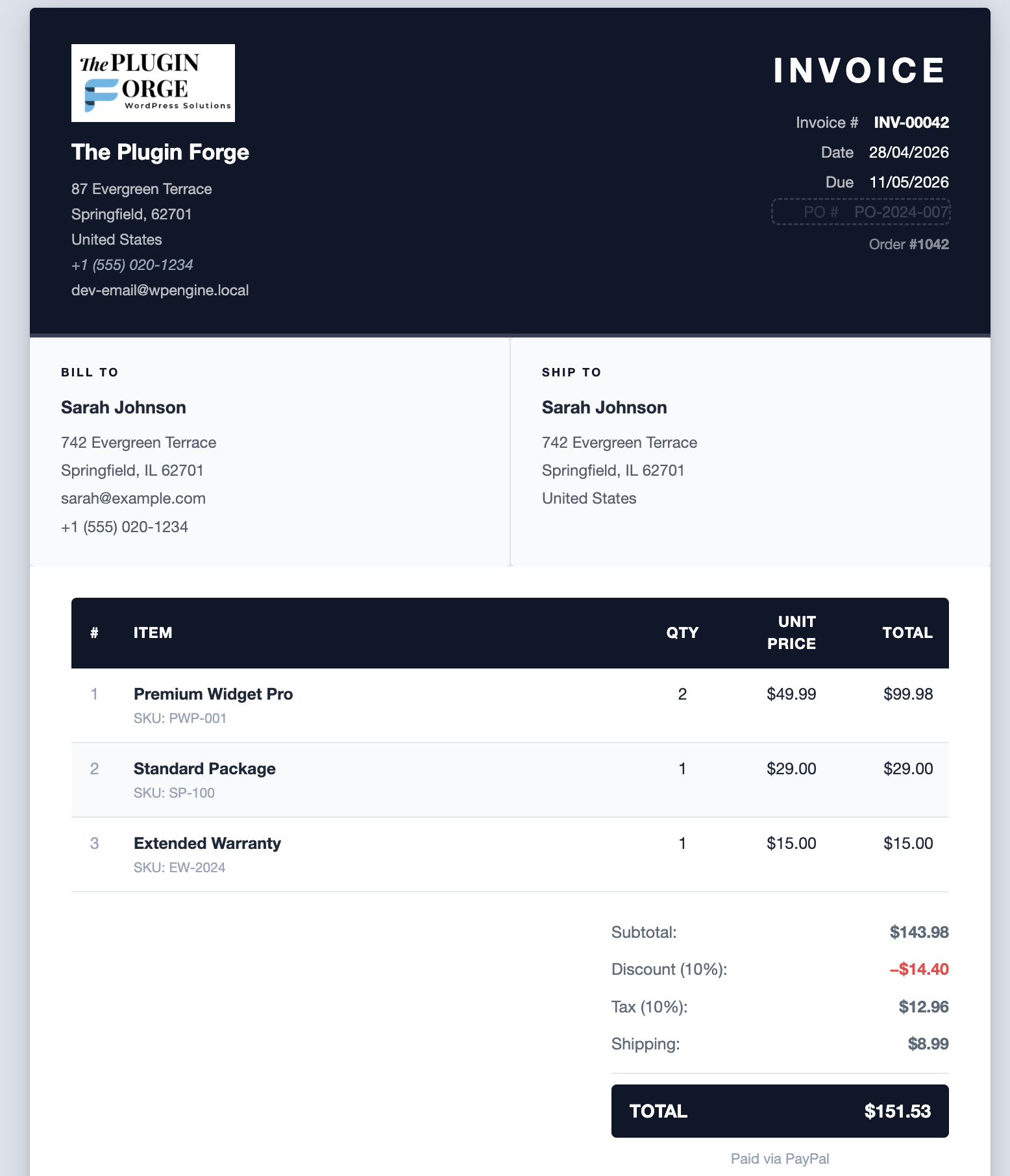
- Live drag-and-drop template builder
- Classic & Modern layouts (6 presets)
- 18 customizable invoice fields
- Auto-attach invoices to emails
- Bulk generate, ZIP & email
- Company logo & signature upload
- One-click download from orders table
- Invoice column with AJAX updates
Design your invoice
without touching code.
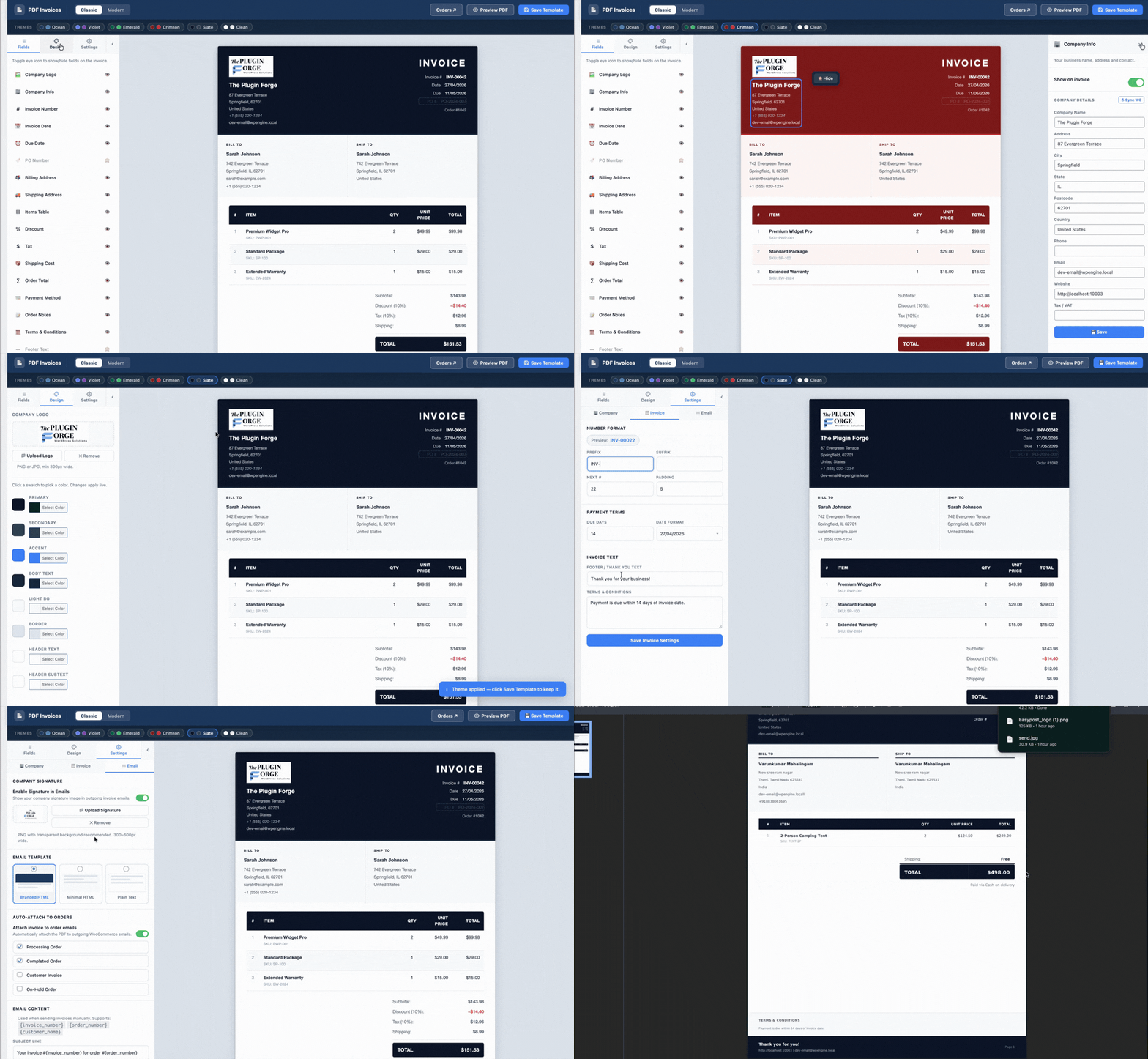
The live template builder lets you switch between Classic and Modern layouts, customise 8 colour slots with a colour picker, toggle individual fields on or off, and see a real invoice preview update in the canvas — all from a single admin screen.
- Two professional layouts: Classic and Modern
- 8 customisable colour slots — primary, secondary, accent, text, header text, and more
- 6 one-click colour presets: Ocean, Violet, Emerald, Crimson, Slate, Clean
- Toggle 18 invoice fields individually (logo, billing, shipping, tax, terms, etc.)
- Live canvas updates instantly as you configure
- Upload company logo from the media library — appears in PDF header and emails
Invoice in the inbox,
the moment an order ships.
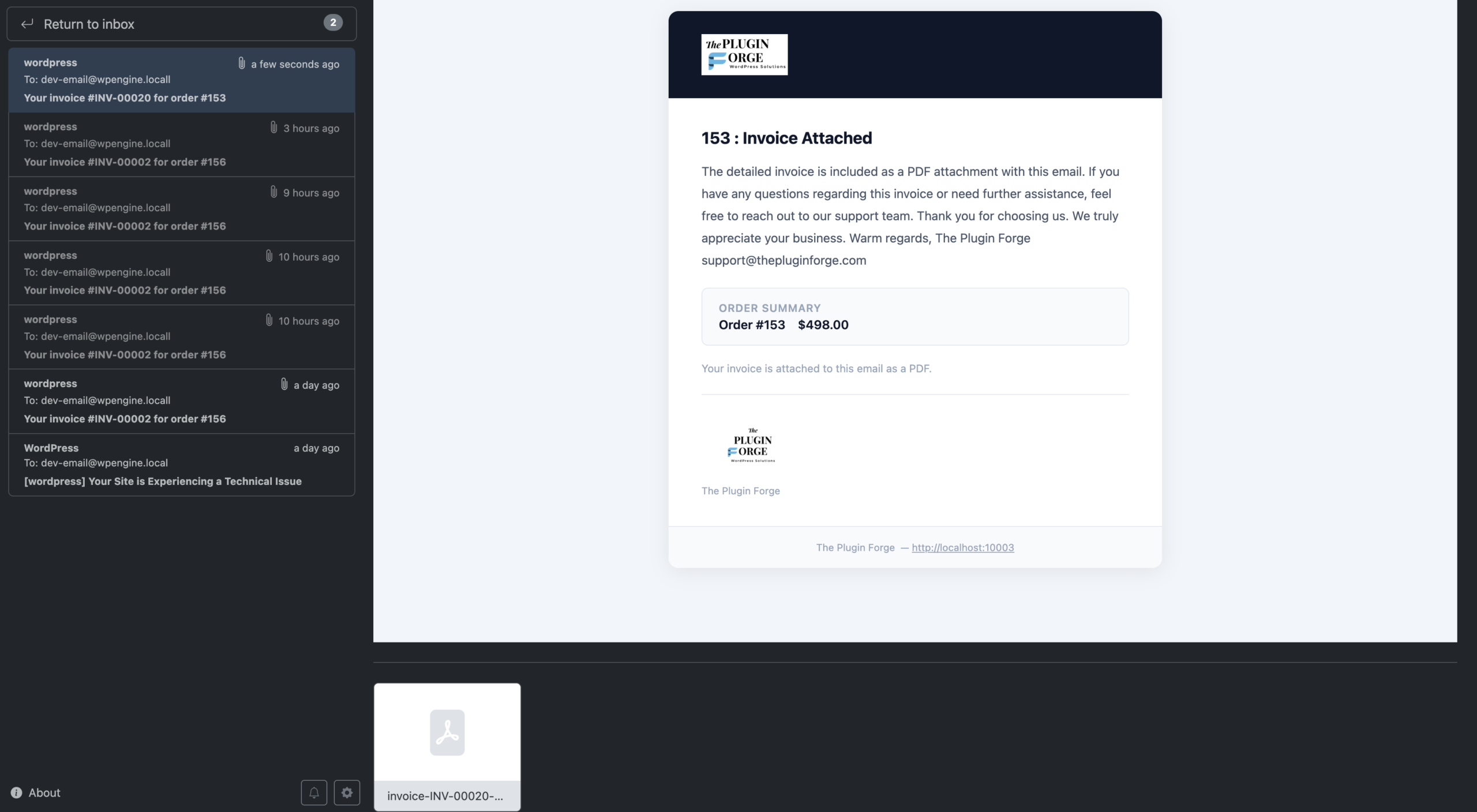
Configure the plugin to automatically attach the PDF invoice to any WooCommerce order email — or send a standalone invoice email on a specific order status. Three professional email templates included.
- Auto-attach to any WooCommerce order email (new order, completed, processing, etc.)
- Standalone invoice email trigger on order status change
- Branded HTML email — uses your primary invoice colour and company logo
- Minimal HTML email — clean, typography-focused, works in all clients
- Plain text email — maximum deliverability, zero formatting
- Company signature image embedded in email body
- Customisable subject, heading, and message with
{invoice_number},{order_number},{customer_name}placeholders
100 invoices.
Three clicks.
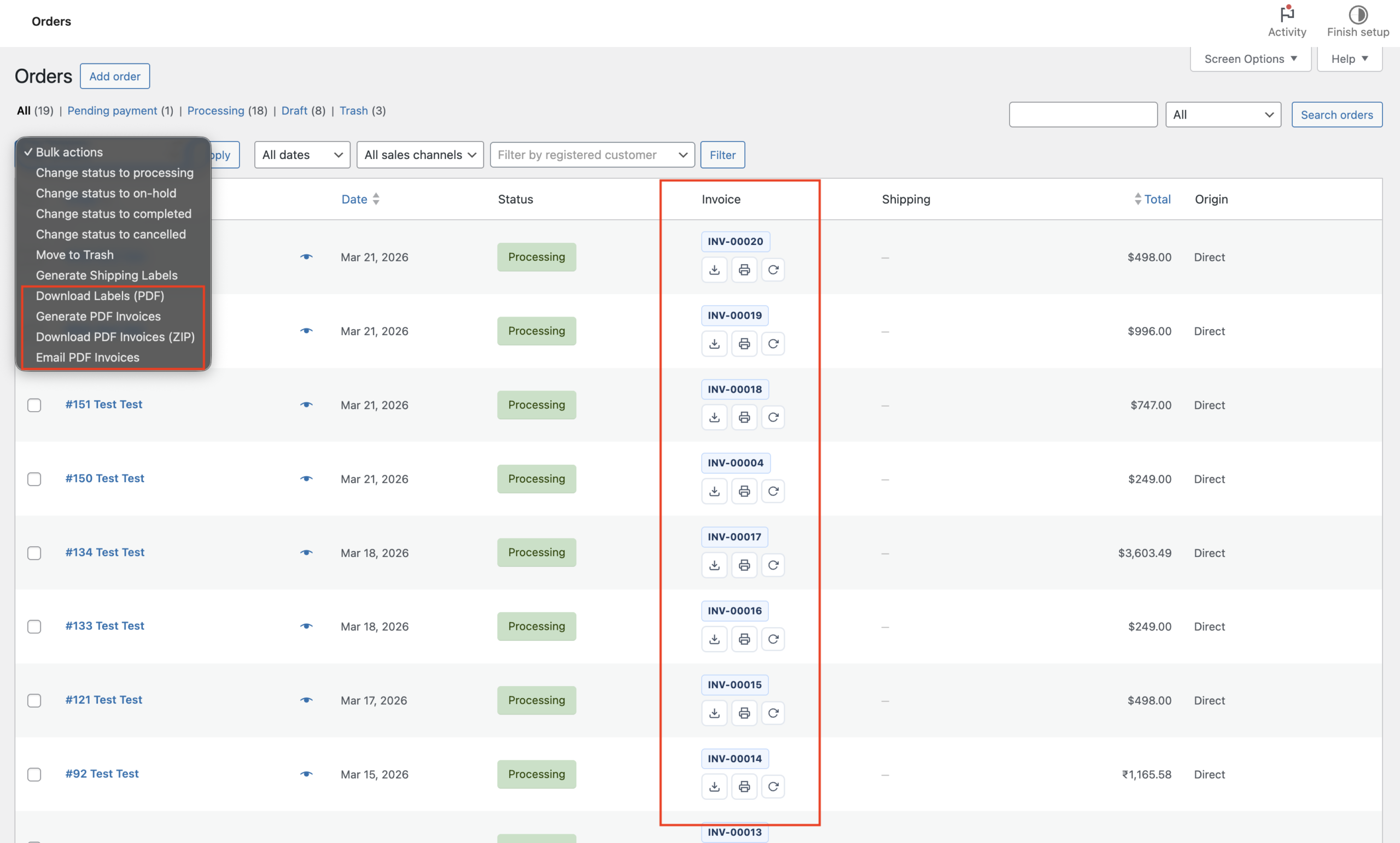
Select any orders in the WooCommerce orders list and run bulk actions: generate all missing invoices, download them as a single ZIP archive, or email them all in one shot. No scripting, no exports, no waiting on a third-party service.
- Bulk generate — creates PDFs for all selected orders at once
- Bulk ZIP download — packages all invoices into a single archive
- Bulk email — sends each customer their invoice individually
- Works on both classic and HPOS order tables
- Progress tracked via WP transients — no PHP timeouts
Every invoice, one click
from the orders table.
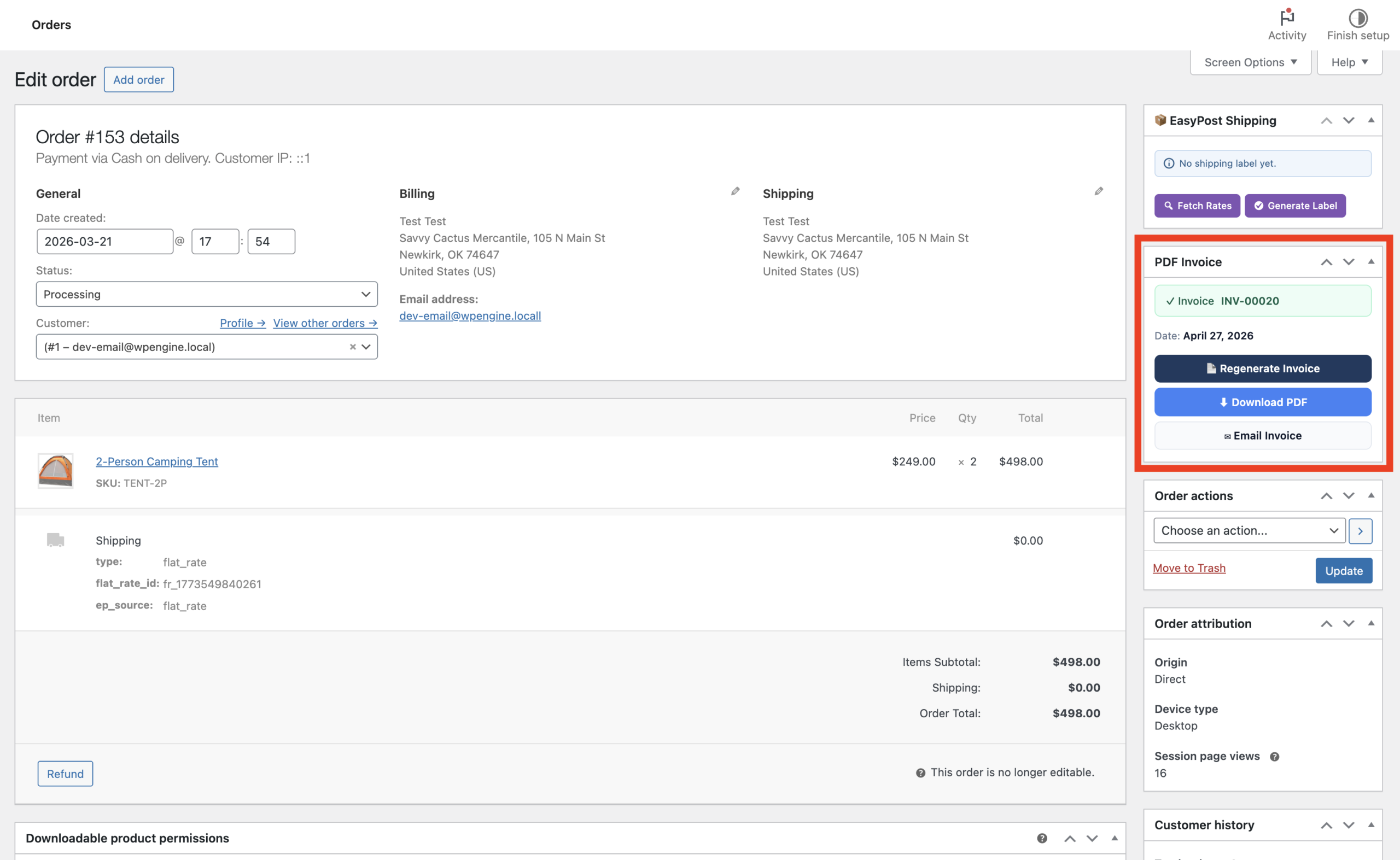
An Invoice column is automatically added to your WooCommerce orders list. Generate, download, print, or regenerate any invoice directly from the table — no need to open the order. The invoice number is shown as a badge when it exists.
- Invoice number badge shown inline in the orders list
- Download PDF button — direct link with signed token auth
- Print PDF button — opens browser print dialog with the invoice pre-loaded
- Regenerate button — rebuilds the PDF with current settings
- Generate button for orders with no invoice yet
- Updates the cell in place via AJAX — no page reload
Ocean
Deep navy + teal. Classic, trustworthy, works for any business type.
Violet
Purple gradient tones. Modern, creative, bold brand presence.
Emerald
Deep forest green + amber accent. Fresh, eco, premium feel.
Crimson
Deep red + orange. Authoritative, energetic, high-contrast.
Slate
Near-black + blue accent. Minimal, sophisticated, ultra-clean.
Clean
White + charcoal. Monochrome, letterhead-style, print-perfect.
From a one-click download to a fully branded PDF in under 10 minutes. Everything below ships in the plugin — no add-ons, no paid tiers, no dependencies.
| Setting | Description |
|---|---|
| Company Name | Appears in the invoice header and email footer |
| Address / City / State / Postcode / Country | Full billing address block shown on every invoice |
| Phone / Email / Website | Contact details displayed in the invoice footer line |
| Tax Number | VAT / GST number shown in the company block |
| Company Logo | Upload from media library; displays in PDF header and branded email |
| Signature Image | Upload a signature image to embed in invoice emails |
| Sync from WooCommerce | One-click button fills all fields from your WooCommerce store settings |
| Setting | Description | Default |
|---|---|---|
| Invoice Prefix | Text prepended to the invoice number (e.g. INV-) | INV- |
| Invoice Suffix | Text appended to the invoice number | — |
| Next Invoice Number | The sequence number for the next generated invoice | 1 |
| Number Padding | Minimum digits, zero-padded (e.g. 4 → 0042) | 4 |
| Date Format | How invoice dates are displayed — 6 format options | d/m/Y |
| Payment Due Days | Days after invoice date until payment is due | 14 |
| Footer / Thank You Text | Shown at the bottom of every invoice | Thank you for your business! |
| Terms & Conditions | Legal text block shown above the footer (optional) | — |
| Setting | Description | Default |
|---|---|---|
| Auto-Attach PDF | Automatically attach invoice PDF to selected WooCommerce emails | Off |
| Attach To | Which emails get the attachment (New Order, Processing, Completed, etc.) | — |
| Email Template | Branded HTML, Minimal HTML, or Plain Text | Branded |
| Enable Signature | Show company signature image inside the email body | Off |
| Email Subject | Supports {invoice_number}, {order_number}, {site_name} | Your invoice #{invoice_number} |
| Email Heading | Main heading inside the email body | Your Invoice |
| Email Message | Body text below the heading. Supports the same placeholders. | — |
manage_shop_order_posts_columns) and HPOS (manage_woocommerce_page_wc-orders_columns). Both table modes are fully supported.includes/vendor/ directory. PDF generation works immediately after activation — no Composer, no shell access, no extra PHP extensions required.INV-), suffix, the starting number, and the zero-padding width. For example: prefix INV-, next number 1, padding 4 produces INV-0001.- Live template builder with Classic and Modern layouts
- 8 colour slots with colour picker and 6 presets
- 18 toggleable invoice fields
- Company logo and signature image support
- Configurable invoice numbering (prefix, suffix, padding)
- Due dates and Terms & Conditions block
- Three email templates: Branded HTML, Minimal HTML, Plain Text
- Auto-attach PDF to any WooCommerce order email
- Standalone invoice email with status trigger
- Bulk generate, ZIP download, and bulk email from orders list
- Invoice column in WooCommerce orders table (HPOS + Classic)
- Signed token download links for customers
- Browser print wrapper with auto-print dialog
- Dompdf bundled — no external dependencies
- WooCommerce HPOS compatibility declared
Beautiful invoices. Automated.
Free to download. Works with any WooCommerce theme. Under 5 minutes to set up.