Flat-rate shipping is a guess. Sometimes you guess too high and lose the sale. Sometimes you guess too low and eat the difference. Live carrier rates remove the guesswork entirely — your customer pays exactly what shipping actually costs, and you charge exactly that amount.
Here’s a complete look at how live rates work in the TheForge EasyPost Shipping plugin.

The Rate Fetching Flow
When a customer enters their shipping address at checkout, the plugin sends a rate request to the EasyPost API. That request includes:
- The customer’s destination address (street, city, state/county, postcode, country)
- Your store’s origin address
- Package weight and dimensions (calculated using the 3D bin packing engine)
- Which carriers and services you’ve enabled in the plugin settings
EasyPost returns rates from every connected carrier and service in typically under a second. The plugin filters the response to show only the services you’ve enabled, then displays them to the customer.
Which Carriers Are Supported?
EasyPost connects to over 100 carriers globally. For most WooCommerce stores, the relevant ones are:
- USPS — Priority Mail, Priority Mail Express, First Class, Media Mail, Parcel Select
- UPS — Ground, 2nd Day Air, Next Day Air, Worldwide Expedited
- FedEx — Ground, Express, Overnight, International
- DHL — Express, Paket, eCommerce
- Regional carriers (vary by country)
You connect your own carrier accounts to EasyPost, so the rates you receive are your negotiated rates, not retail rates.
Enabling and Ordering Services
Not every carrier service makes sense for every store. A craft shop doesn’t need UPS Next Day Air. An electronics retailer might need it. The plugin’s carrier management panel lets you enable exactly the services you want to offer, drag them into your preferred display order, and add handling fees or discounts per service.
Rate Caching
Making a live API call for every keypress in the address field would be slow and expensive. The plugin caches rates intelligently: once rates have been fetched for a given address and basket combination, they’re cached for a configurable period. Return visitors or customers who refine their address see instant results without another API call.
Delivery Estimates
EasyPost returns estimated delivery days alongside each rate. The plugin can display these next to the rate label. You control the format: “Estimated delivery: {days} business days”, “— arrives in {days} days”, or any custom string with the {days} placeholder.
Free Shipping Threshold
You can configure a free shipping threshold directly in the plugin settings. Orders above a certain value get free shipping — the plugin adds a “Free Shipping” option to the rates list and can optionally hide the paid options when the threshold is met.
Troubleshooting: No Rates Appearing
If no rates appear at checkout, the most common causes are:
- Missing package dimensions — products need weight and dimensions set in WooCommerce
- No carrier accounts connected in your EasyPost dashboard
- No services enabled in the plugin’s carrier management panel
- Address too incomplete for EasyPost to rate — the customer needs to enter at least a postcode
Full documentation and troubleshooting help is available at the ThePluginForge support page.
Download TheForge EasyPost Shipping free →
If you’re fulfilling more than a handful of orders a day, printing shipping labels one at a time is one of the biggest drains on your operational time. Open order, create shipment, select service, generate label, download PDF, print — then repeat for every single order. At 50 orders a day, that process takes most of your morning.
The TheForge EasyPost Shipping & Bulk Label Printing plugin was built specifically to solve this. Here’s a complete look at how the labels panel works and how to get the most out of it.
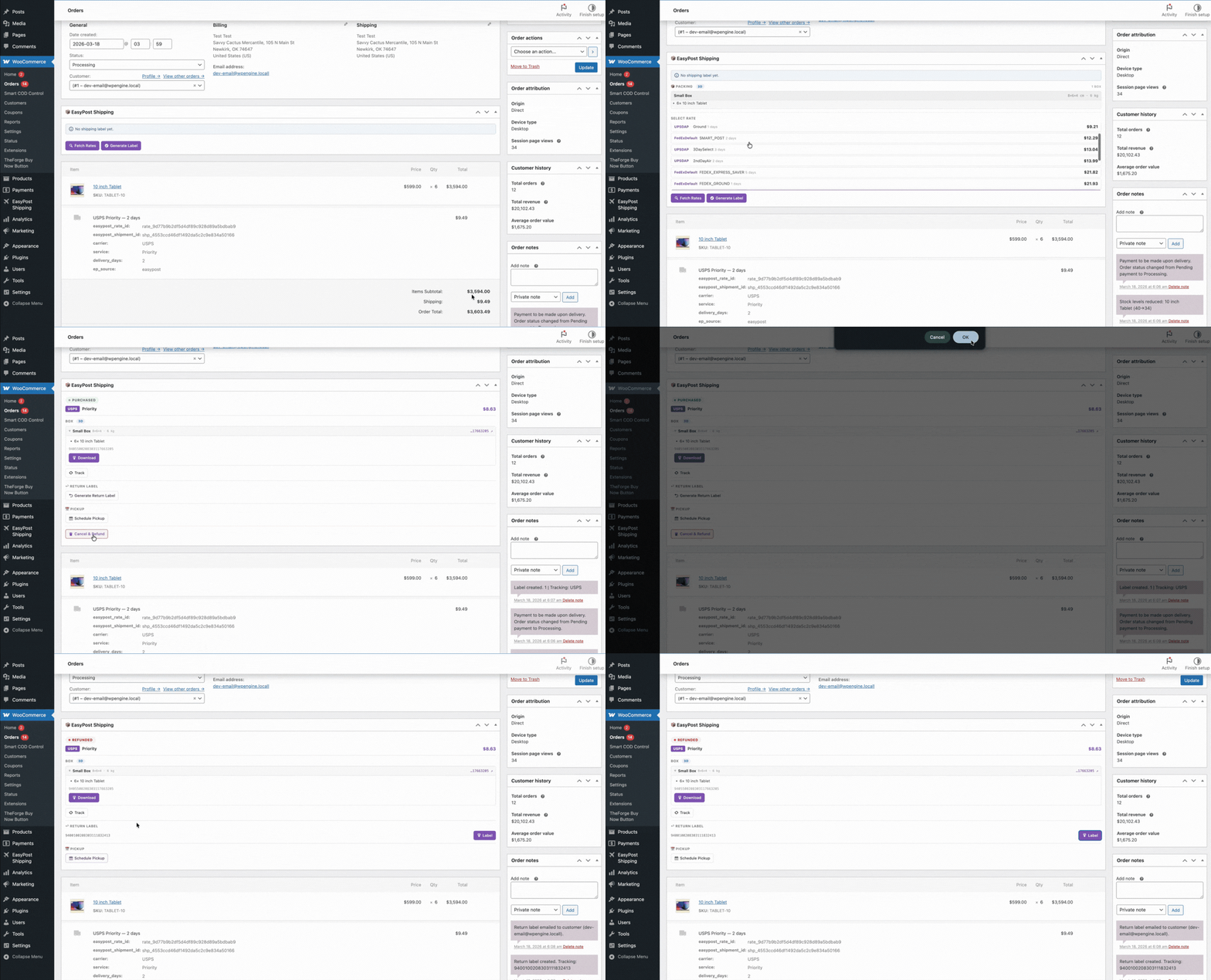
The Labels Panel: What It Is
The labels panel lives directly inside the WooCommerce orders screen. You don’t need to visit a separate dashboard or log into a carrier portal. Every order you have in WooCommerce is accessible from the same interface you already use to manage your store.
From the labels panel you can:
- Generate a label for any individual order in one click
- Select multiple orders and generate all their labels at once
- Download all generated labels as a single merged PDF
- Void labels you no longer need
- Track shipment status without leaving WordPress
How Bulk Label Generation Works
Select your orders using the standard WooCommerce order checkboxes, then choose Generate Labels from the bulk actions dropdown. The plugin sends each order’s details to EasyPost — customer address, package dimensions, selected carrier service — and receives a label back for each one.
The plugin uses the shipping service the customer chose at checkout wherever possible. If no carrier was selected (for example, on orders placed before the plugin was installed), you can configure a default fallback carrier and service for bulk generation.
Merging Labels into a Single PDF
Once labels are generated, click Print All Labels. The plugin fetches every generated label and merges them into a single PDF file — one download, one print job. If you’re using a thermal label printer (which you should be — they’re dramatically faster than laser or inkjet for shipping labels), the PDF is formatted to print one label per page.

Voiding Labels
Printed a label for an order that was then cancelled? No problem. Void the label directly from the order screen and EasyPost will request a refund from the carrier. Most carriers process voids within 24–48 hours.
Package Dimensions and Weight
For accurate labels, the plugin needs package dimensions and weight. You can set these at the product level (the plugin reads WooCommerce’s built-in weight and dimensions fields) or define custom boxes at a store level. The 3D bin packing engine figures out the best box combination automatically — you don’t have to calculate it manually.
Setting Up Your Default Carrier
Go to WooCommerce → Settings → Shipping → EasyPost to configure which carrier and service are used when generating labels without an explicit customer choice. You can set different defaults for domestic and international orders.
Carrier Account Credentials
The plugin connects to EasyPost using your EasyPost API key, which in turn connects to your carrier accounts. You’ll need an EasyPost account (free) and at least one connected carrier account. EasyPost supports USPS, UPS, FedEx, DHL, and dozens of regional carriers — connect the ones relevant to your business.
Tips for High-Volume Stores
- Sort orders by status before bulk-selecting — process “Processing” orders as a batch to avoid accidentally labelling “On Hold” orders
- Use a thermal label printer — laser labels work but thermal printers are faster and the consumables are cheaper
- Set up automatic order status updates — the plugin can move orders to “Shipped” automatically once a label is generated
- Schedule your fulfilment run — generate all your labels at the same time each day, just before your carrier pickup window
Need help setting up the labels panel? Visit the ThePluginForge support page for documentation and assistance.
Download TheForge EasyPost Shipping free →
There’s no shortage of WooCommerce plugins. Most of them do too little, cost too much, or create more problems than they solve. ThePluginForge has taken a different approach — focused tools that solve specific, painful problems and don’t ask for a subscription to do it.
EasyPost Shipping & Bulk Label Printing
The flagship plugin. TheForge EasyPost Shipping brings live multi-carrier rates, smart 3D bin packing, address validation, one-click label generation, bulk printing, return labels, insurance, carrier pickups, and a full analytics dashboard to WooCommerce — all in one plugin, all free.
For stores shipping more than 20 orders a day, the bulk label printing alone pays for itself in saved time within the first week.
Smart COD Control
Smart COD Control is built for WooCommerce stores in markets where Cash on Delivery dominates and fraud is a real cost. OTP verification, eligibility rules, postcode blocking, COD fees and customer trust scoring give store owners real control over their COD risk.
Stores report RTO rate reductions of 40–60% after enabling OTP verification. For a store processing 100 COD orders a day at 30% RTO, that’s a meaningful saving in carrier fees and lost inventory.
Buy Now Button
The Buy Now Button is elegantly simple: skip the cart, go straight to checkout. For stores with high-intent product pages — landing pages, email campaigns, social ads — it removes the biggest drop-off point between intent and purchase.
Free. No Upsells. No Subscriptions.
All three plugins are genuinely free. No “pro” version gatekeeping the features you actually need. No monthly subscription to access the API. ThePluginForge’s model is straightforward: build great free plugins, earn trust, and let the quality speak for itself.
Browse all plugins at thepluginforge.com →
Most WooCommerce stores cobble together their shipping setup piece by piece — a rate plugin here, a label solution there, manual address checks somewhere else. The result is a fragmented workflow that slows down fulfilment and bleeds money. Here’s what a proper setup looks like.
Step 1: Live Carrier Rates at Checkout
Start with accurate rates. The TheForge EasyPost Shipping plugin connects to USPS, UPS, FedEx, DHL and more via the EasyPost API, fetching real rates for every customer’s exact address and basket at checkout. No more guessing, no more flat-rate losses.
Step 2: Smart Box Packing
Carrier rates are calculated per parcel. The more accurately you can work out how many boxes an order needs, the more accurate your rates. TheForge’s 3D bin packing algorithm tests every combination of items and boxes to find the cheapest valid configuration.
Step 3: Address Validation
Validate every customer address before the order is placed. Bad addresses mean returned shipments and double shipping costs. EasyPost’s built-in verification catches problems at checkout, not at the post office.
Step 4: One-Click Label Generation
Once an order is placed, generate the label directly from the WooCommerce order screen. No logging into a separate carrier portal, no copy-pasting addresses.
Step 5: Bulk Label Printing
At the end of each fulfilment run, select all your ready orders and print every label as a single PDF. Combined with a thermal label printer, this turns a 90-minute job into a 10-minute one.
Step 6: Tracking and Webhooks
EasyPost sends real-time tracking updates. TheForge’s plugin receives them via webhook and automatically updates order statuses and sends customer tracking emails — without you lifting a finger.
Start with TheForge EasyPost Shipping — it’s free →
The average WooCommerce cart abandonment rate is around 70%. That means seven out of ten people who add something to their cart never pay. Most of those losses happen at or before checkout. Here are five things you can do about it.
1. Skip the Cart with a Buy Now Button
The most direct fix: remove the cart entirely for customers who are ready to buy. The TheForge Buy Now Button adds a straight-to-checkout button on product pages. Fewer steps, fewer drop-offs.
2. Reduce Checkout Fields
Most WooCommerce stores ask for far more information than they need to ship a package. Remove unnecessary fields, make address line 2 optional, and auto-complete addresses where possible.
3. Offer the Right Payment Methods
In cash-heavy markets, not offering COD kills conversion. But offering COD without controls invites fraud. The Smart COD Control plugin lets you offer COD intelligently — available to genuine customers, blocked or fee-gated for risky ones.
4. Show Real Shipping Costs Upfront
Surprise shipping costs at checkout are the number one stated reason for cart abandonment. Live carrier rates via the EasyPost Shipping plugin mean customers see accurate costs before they start the checkout flow.
5. Validate Addresses Before Payment
Nothing kills the checkout experience like a payment failing because of an address error. Real-time address validation catches problems before the customer hits the pay button.
All three TheForge plugins — EasyPost Shipping, Smart COD Control and Buy Now Button — are free and built specifically for WooCommerce stores that take performance seriously.
Every extra step between a customer deciding to buy and actually paying is an opportunity for them to change their mind. The cart page is one of the biggest drop-off points in any WooCommerce store. A Buy Now button removes it entirely.
What the Buy Now Button Does
The TheForge Buy Now Button plugin adds a customisable button to any WooCommerce product that skips the cart and sends the customer directly to checkout. One click, straight to payment.
Works on All Product Types
Simple products, variable products, grouped products — the Buy Now button handles them all. For variable products, it waits until the customer has selected their options, then takes them straight to checkout with the right variation already in the basket.
Customise Everything
Change the button text, colour, size and position without touching CSS. Put it above or below the standard Add to Cart button, or replace the Add to Cart entirely for specific products or categories.
Single Product Checkout
The plugin clears the cart before adding the product, so customers check out with just that one item — ideal for stores selling individual high-value products or subscriptions.
Works with Any Theme
No page builder required, no shortcode gymnastics. The button drops into your product pages automatically and inherits your theme’s button styles, or you can override them completely.
Download Buy Now Button free →
Every COD order is a risk. Every prepaid order is guaranteed revenue. The goal isn’t to eliminate COD — in many markets you’d kill your conversion rate — but to shift the balance in your favour without alienating customers.
Prepaid Discounts
One of the most effective techniques: offer a small discount on prepaid orders. The Smart COD Control plugin pairs naturally with this strategy — tighten COD eligibility rules while making prepaid more attractive.
COD Fees as a Nudge
Add a visible handling fee to COD orders. When a customer sees “Cash on Delivery + ₹40 handling fee” vs “Pay online — free”, many will choose prepaid. The fee doesn’t have to be large to be effective.
Customer Trust Scoring
New customers with no order history are higher risk. Smart COD Control lets you restrict COD to customers who have already placed and received at least one prepaid order — building trust before extending COD eligibility.
Category and Product Rules
Some products are higher risk than others. Block COD on fragile items, high-value electronics, or custom/personalised products where returns are especially costly.
Transparent Reporting
Track your COD vs prepaid split, RTO rates and blocked order counts directly in WooCommerce. The data helps you tune your rules over time.
Cash on Delivery is the dominant payment method across South Asia, the Middle East and much of Africa — but it comes with a serious problem. Return-to-origin rates as high as 30–40% are common, driven by fake orders, buyer’s remorse, and outright fraud. Every RTO shipment costs you the label, the packaging and the carrier fee.
Smart Rules for COD Eligibility
The TheForge Smart COD Control plugin lets you define exactly when COD is available. Block it for new customers, high-value orders, specific postcodes, or product categories. Only offer it to customers with a solid order history.
OTP Verification
Before a COD order goes through, the customer enters a one-time PIN sent to their phone. Fake phone numbers fail immediately. Customers who aren’t genuinely expecting the delivery don’t complete the verification. RTO rates drop dramatically.
Order Value Limits
Set a minimum and maximum order value for COD. High-value orders carry more risk — nudge those customers toward prepaid methods instead.
Pincode / Postcode Blocking
If certain areas consistently generate high RTOs, block COD for those pincodes entirely. Paste in a list and the plugin handles the rest.
Fee for COD
Add a small handling fee to COD orders to cover the risk and nudge customers toward prepaid payment methods.
Download Smart COD Control free →
Address problems are one of the most frustrating and expensive issues in ecommerce fulfilment. A customer types their postcode wrong, the package bounces back, and you’re out the shipping cost — sometimes twice.
Validate Addresses in Real Time
The TheForge EasyPost Shipping plugin validates customer addresses against the EasyPost address verification service as they type at checkout. A green tick means the address is deliverable. A warning means there’s a problem — before the order is ever placed.
Warn or Block
You choose the behaviour. Set it to warn only — the customer sees a warning but can still check out. Or set it to block checkout — no order goes through with an unverifiable address. Particularly useful for high-value orders where a failed delivery would be costly.
No Extra Plugins Required
Address validation is built directly into the EasyPost plugin — no separate extension, no extra subscription, no third-party service to configure. It works with EasyPost’s existing verification API.
USPS Address Standardisation
For US addresses, EasyPost normalises the address to USPS standards — correcting apartment formats, adding missing ZIP+4 codes and standardising state abbreviations. The cleaned address is what goes on the label.
Get TheForge EasyPost Shipping free →
Flat-rate shipping sounds simple, but it almost always means one of two things: you overcharge customers and lose sales, or you undercharge and eat the difference. Neither is acceptable when you’re running a real business.
Why Live Carrier Rates Matter
When WooCommerce fetches shipping rates live from USPS, UPS, FedEx and DHL at the moment of checkout, your customers pay exactly what shipping actually costs — no more, no less. That’s what the TheForge EasyPost Shipping plugin delivers.
How EasyPost Works
EasyPost is a multi-carrier shipping API used by major ecommerce companies. TheForge’s plugin wraps EasyPost in a clean WooCommerce-native interface, so you get enterprise-grade carrier access without enterprise complexity.
Rate Caching for Performance
Live API calls at checkout could slow your store down. TheForge caches rates intelligently so repeat visitors with the same address and basket see instant results without another API call.
Service Control
Not every carrier service makes sense for your store. The plugin’s carrier control panel lets you enable only the services you want to offer, drag them into priority order, and add handling fees or discounts per service.
Delivery Estimates
Show customers estimated delivery days next to each rate at checkout. Set the format exactly how you want it: “Ships in {days} days”, “— {days} day delivery”, or anything else.