Fake orders are the silent killer of COD profitability. A customer places an order impulsively, ignores delivery attempts, and your store absorbs the return shipping cost. Multiply that by hundreds of orders per month and the numbers get painful fast.
Smart COD Control v1.3.1 introduces OTP (One-Time Password) Phone Verification — a simple, effective friction layer that stops unserious buyers before the order is even placed.

How OTP Verification Works
- The customer selects Cash on Delivery at checkout.
- A phone number field appears with a Send Code button.
- An SMS with a 6-digit code is sent to their number via your configured SMS provider (Twilio or Vonage).
- The customer enters the code. Only after successful verification can they place the order.
- The verified phone number is saved to the order for your records.
The entire flow happens inline at checkout — no page reload, no redirect. It takes under 30 seconds for a legitimate customer and completely stops automated or throwaway orders.
Why OTP Is More Effective Than Blacklists Alone
Blacklists are reactive — you add a phone number or address after you get burned. OTP verification is proactive. Customers who are not serious enough to verify a real phone number will not proceed, and your inventory stays reserved for genuine buyers.
Studies from COD-heavy markets show 30–60% reduction in RTO (Return to Origin) rates after implementing OTP gating on COD orders.
Supported SMS Providers
- Twilio — global coverage, easy setup with Account SID + Auth Token
- Vonage (formerly Nexmo) — competitive rates for South Asia and the Middle East
Configuring OTP in Smart COD Control
- Go to WooCommerce → Smart COD Control → OTP Settings.
- Enable OTP Verification for COD.
- Choose your SMS provider (Twilio or Vonage).
- Enter your API credentials.
- Set the sender name / number that will appear on the SMS.
- Optionally customise the OTP message template.
- Save settings and test with a real phone number before going live.
OTP + Rule Builder = Complete Fraud Defense
Use the Visual Rule Builder to restrict COD to specific zones and cart ranges, and layer OTP verification on top. Together they give you the most complete COD fraud prevention available for WooCommerce — without any custom development.
Update to v1.3.1 from your WordPress dashboard to enable OTP today.
Cash on Delivery is one of the most popular payment methods in South Asia, the Middle East, and many emerging markets — but it comes with a catch: unverified orders, high cancellation rates, and fraud. Until now, controlling when COD is shown has required custom code or a patchwork of plugins.
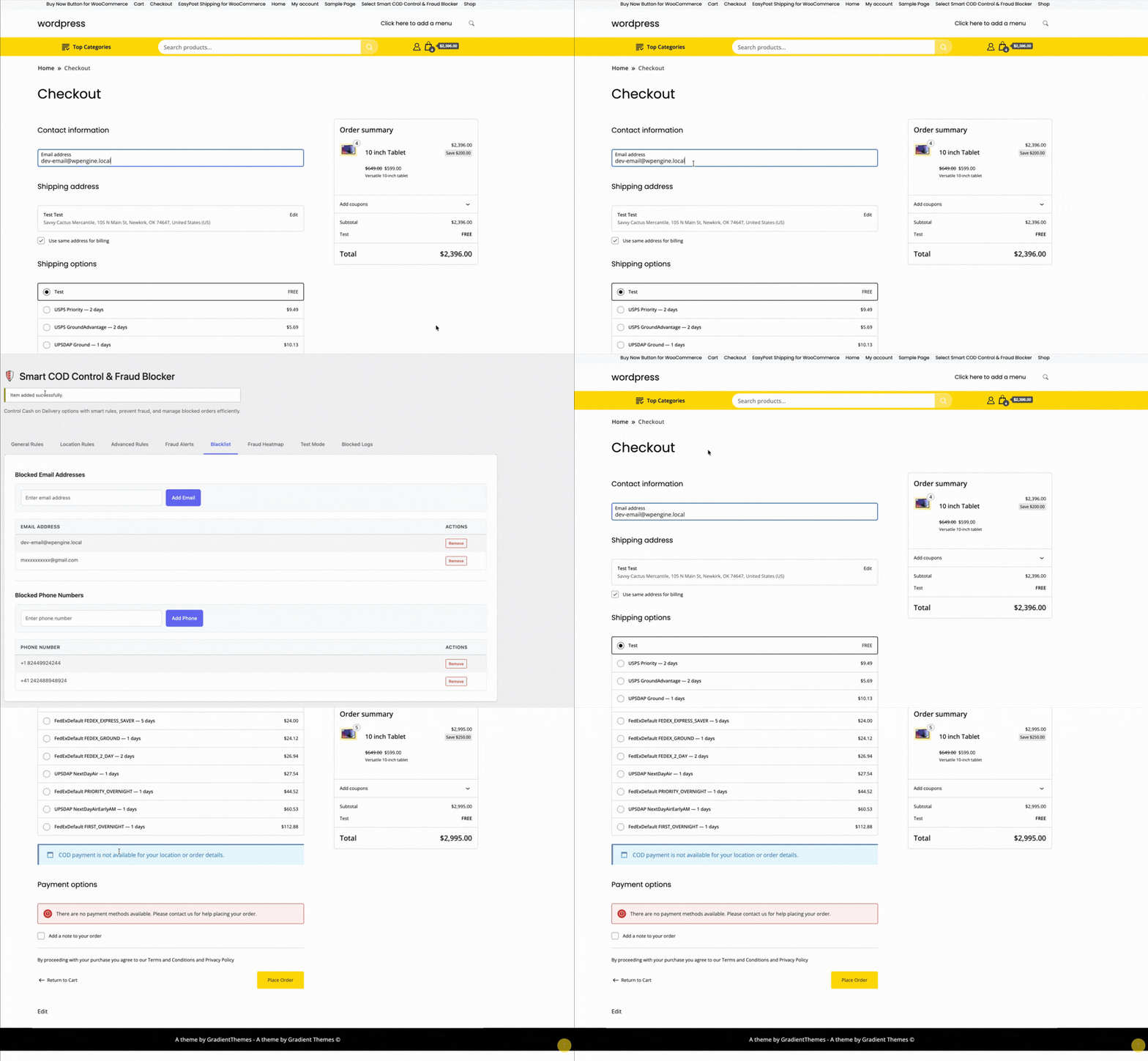
Smart COD Control v1.3 changes that with a brand-new Visual Rule Builder — a point-and-click interface for building precise COD availability rules without touching a single line of PHP.
What Is the Visual Rule Builder?
The Visual Rule Builder is an admin panel that lets you create rule groups. Each group contains one or more conditions. Within a group, conditions are joined with AND logic (all must match). Between groups, logic is OR (any group can enable COD). This mirrors how professional rule engines work and gives you near-infinite flexibility.
What Can You Filter By?
- Cart total — e.g., disable COD for orders above ₹5,000
- Shipping zone / state / city — block COD for specific regions or pin codes
- Product or category — hide COD for fragile, perishable, or high-value items
- Customer order history — restrict COD for customers with previous cancellations
- User role — enable COD only for verified wholesale buyers
- Coupon applied — hide COD when a discount coupon is active
How to Build Your First Rule
- Navigate to WooCommerce → Smart COD Control → Rule Builder.
- Click Add Rule Group.
- Inside the group, click Add Condition and choose a condition type from the dropdown (e.g., Cart Total).
- Set the operator (is greater than) and value (5000).
- Add more conditions to the same group to AND them together, or add a new group to OR with the first.
- Set the group action to Hide COD or Show COD.
- Save. Rules take effect instantly at checkout — no cache clearing needed.
Pre-Built Templates
Not sure where to start? Smart COD Control ships with ready-made rule templates:
- Disable COD for high-value carts
- Enable COD only for specific states
- Hide COD for repeat cancellers
One click loads the template; you tweak the values to fit your store.
AND / OR Logic Explained
Think of it like a spreadsheet filter. If you need COD hidden when cart total > 5000 AND state is Maharashtra, put both conditions in the same group. If you want it hidden when cart total > 5000 OR product is fragile, put each in its own group.
Upgrade to v1.3 Today
The Visual Rule Builder is available in Smart COD Control v1.3.0 and above. Update via your WordPress dashboard or download the latest version from your account. No configuration migration needed — existing simple block/allow settings are preserved.
ThePluginForge builds free WooCommerce plugins — EasyPost Shipping, Smart COD Control, and Buy Now Button — and backs them with real support. Here’s where to find help and how to get the most out of the support resources available.
Documentation
Each plugin has a dedicated documentation section covering installation, configuration, and all settings. Start there before submitting a support request — most common questions are answered in the docs.
- EasyPost Shipping docs — covers EasyPost account setup, carrier connection, rate configuration, label generation, and tracking
- Smart COD Control docs — covers OTP setup, gateway configuration, location rules, fee settings, and trust scoring
- Buy Now Button docs — covers installation, button configuration, variable products, shortcodes, and analytics
The Support Page
For issues not covered in the documentation, visit the ThePluginForge support page. Submit your question with:
- Your WordPress and WooCommerce versions
- The plugin version you’re running
- A clear description of the issue
- Any error messages you’re seeing (copy the exact text)
- What you’ve already tried
The more detail you provide, the faster your issue can be resolved.

Common Issues and Fixes
EasyPost Shipping: No rates appearing at checkout
Check that products have weight and dimensions set, that your EasyPost API key is valid, that carrier accounts are connected in your EasyPost dashboard, and that at least one carrier service is enabled in the plugin settings.
Smart COD Control: OTP not being received
Verify your SMS gateway API credentials, check that the phone number format is correct for your gateway (international format vs local format), and confirm there are no balance or sending limit issues with your gateway account.
Buy Now Button: Button not appearing
Check the plugin is active, that the product type is supported (simple or variable), and that the button hasn’t been disabled for that specific product or category in the plugin settings.
WordPress.org Support Forums
All three plugins are available on WordPress.org, which means they have public support forums on the plugin pages. The forums are monitored regularly and are a good place to search for issues others have encountered and resolved.
Staying Updated
Keep your plugins updated to the latest version — most bug fixes and compatibility updates are delivered via plugin updates. Enable automatic updates in WordPress or check for updates regularly in Dashboard → Updates.
Visit the ThePluginForge support page →
Running a WooCommerce store in South Asia — India, Pakistan, Bangladesh, Sri Lanka, Nepal — presents a specific set of challenges that most WooCommerce advice doesn’t address. Cash on Delivery dominates. Return to Origin rates are high. Shipping costs are a major factor in purchase decisions. And competition for customer attention is fierce.
ThePluginForge’s three free plugins were built with exactly these challenges in mind.
The COD Problem
In India, COD accounts for 50–70% of ecommerce transactions. That number is even higher in tier-2 and tier-3 cities. Refusing COD costs sales. Offering COD without controls costs you in RTO fees, wasted packaging, and unsold returned inventory.
Smart COD Control is built for this balance:
- OTP verification eliminates fake COD orders before they ship
- Pincode blocking removes high-RTO areas from your COD coverage
- Customer trust scoring rewards repeat buyers with smoother COD access
- COD fees nudge customers toward UPI and online payment
The Shipping Rate Problem
India has a complex carrier landscape — Delhivery, Shiprocket, BlueDart, DTDC, India Post, Xpressbees — each with different rate structures, coverage, and performance. Managing carrier selection and rate display is time-consuming without the right tools.
TheForge EasyPost Shipping connects to multiple carriers via a single API, displays live rates at checkout, and generates labels directly from your WooCommerce dashboard. For stores shipping domestic and international parcels, the bulk label printing feature alone saves significant daily time.

The Conversion Problem
Mobile commerce is dominant in South Asia — over 70% of ecommerce traffic comes from smartphones. Mobile checkout friction is a significant conversion killer. Long checkout flows, multi-step cart pages, and small touch targets all reduce conversion.
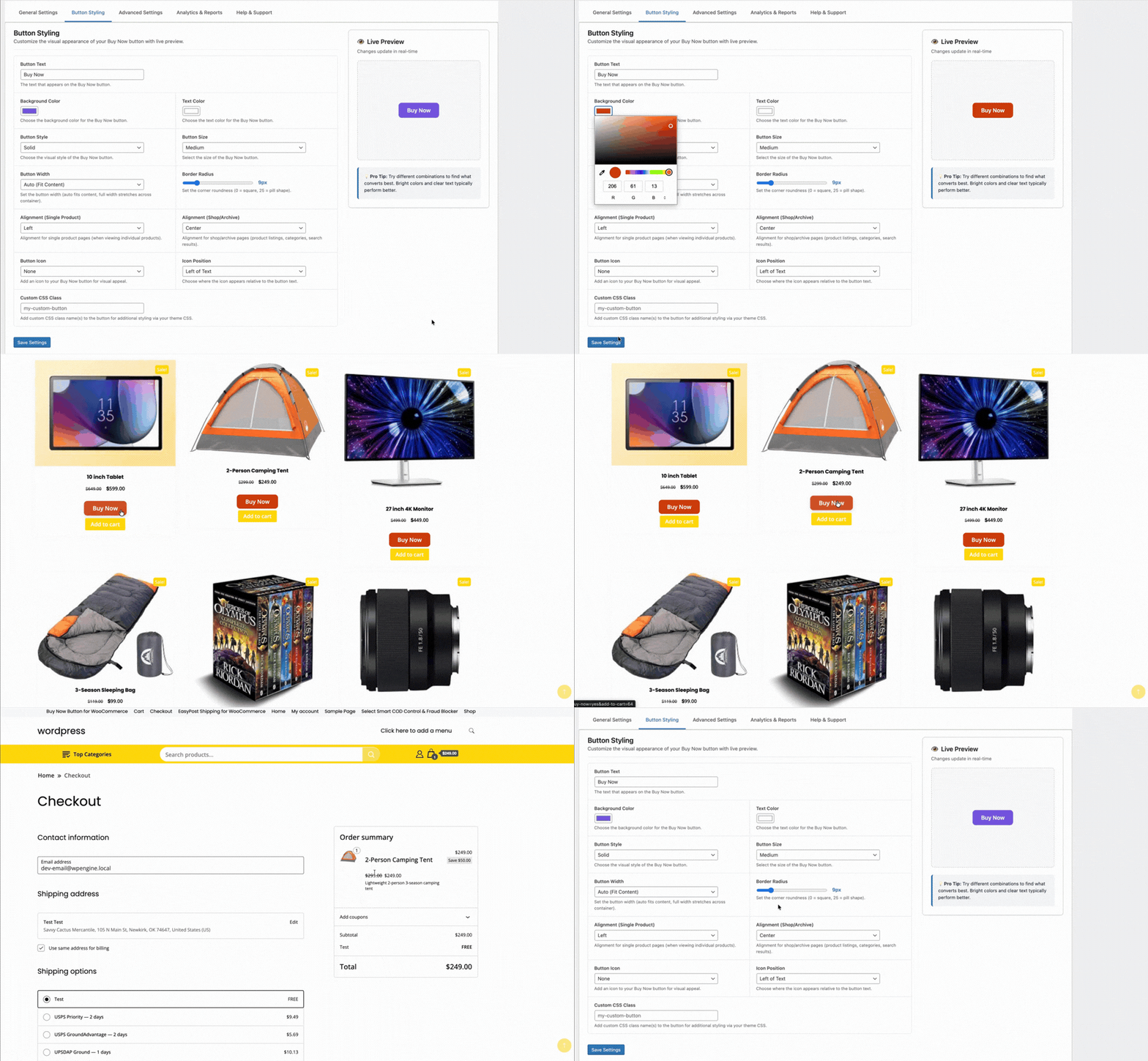
TheForge Buy Now Button compresses the checkout flow to two steps for mobile users. For stores driving traffic from WhatsApp campaigns, Facebook ads, and Instagram — all of which are major acquisition channels in the region — a direct Buy Now link is transformatively effective.
The Stack in Practice
A typical ThePluginForge setup for a South Asian WooCommerce store:
- Smart COD Control — OTP for new customers, pincode blocks for problem areas, ₹40 COD fee
- EasyPost Shipping — live carrier rates, bulk labels generated daily, automated tracking emails
- Buy Now Button — on all product pages, full-width on mobile, single-item checkout mode
All three plugins are free with no upsells or subscriptions. Start at thepluginforge.com or get help at the support page.
Traffic from a paid ad or email campaign is different from organic product discovery. The visitor has already been convinced to click — they have intent. What kills that intent is friction: a cart, unnecessary navigation, too many choices. The Buy Now button is built for exactly this scenario.
Landing Page Setup
A WooCommerce product page is also a landing page when you drive traffic directly to it. With the TheForge Buy Now Button plugin, you can configure that product page to show only the Buy Now button — no Add to Cart — and set it to clear the cart before checkout. The result is a single-focus page: arrive, choose options (if any), click Buy Now, pay.
Creating Dedicated Landing Pages
For higher-volume campaigns, you might want a dedicated landing page that’s not your standard product page template. Options:
- WooCommerce product page with a full-width template — remove the sidebar, header navigation, and footer links to remove distraction
- Page builder integration — embed the Buy Now button shortcode in a page built with Elementor, Beaver Builder, or similar
- Custom template — create a custom product template in your theme for landing page use
The Buy Now Button plugin provides a shortcode ([tpf_buy_now product_id="123"]) you can use anywhere in WordPress content.
Email Campaign Links
The most powerful use case: email campaigns with direct Buy Now links. Instead of linking to the product page and hoping the customer clicks through the cart, your email includes a “Buy Now →” button that takes them directly to the checkout with the product pre-loaded.
You can construct this URL using WooCommerce’s built-in cart shortcut: /?add-to-cart=PRODUCT_ID&quantity=1&tpf_bn=1. The plugin intercepts this request and redirects to checkout directly.
Facebook and Google Ads
For paid social and search ads that link to a product page, the Buy Now button reduces the post-click steps from four (product → add to cart → cart → checkout) to two (product → checkout). This typically improves your return on ad spend because fewer visitors drop off between the click and the purchase.
Measuring Ad Campaign Performance
Use the Buy Now Button analytics panel alongside your ad platform’s attribution data. Compare conversion rates for landing pages with the Buy Now button versus standard product pages. If you’re running A/B tests, the plugin’s click and conversion data complements your ad platform’s reporting.
Reducing Cart Abandonment for Ad Traffic
Cart abandonment is higher for ad traffic than for organic traffic — ad visitors are less committed and more likely to be distracted. By removing the cart page, you eliminate one of the highest-abandonment points in the journey for this traffic segment.
For campaign setup advice, visit the ThePluginForge support page.
Download Buy Now Button free →
Every WooCommerce checkout starts with a cart. But for stores where customers typically buy one product at a time — or where you’re driving traffic from ads or emails to a specific product — the cart is dead weight. It’s a detour between intent and purchase.
The TheForge Buy Now Button plugin replaces that detour with a direct route.
The Standard WooCommerce Checkout Flow
Without a Buy Now button, the customer journey is:
- Product page → click Add to Cart
- Cart icon updates → customer navigates to cart
- Cart page → review items → click Proceed to Checkout
- Checkout page → enter details → pay
Steps 2 and 3 are pure friction. The cart page asks the customer to confirm a decision they’ve already made. Every additional page is an exit opportunity.
The Buy Now Flow
- Product page → click Buy Now
- Checkout page → enter details → pay
Two fewer steps. Two fewer exit opportunities. Studies on ecommerce checkout optimisation consistently show that reducing steps increases conversion, particularly on mobile where multi-step navigation is especially cumbersome.
Single Item Checkout: Clearing the Cart
The Buy Now Button plugin has a Clear Cart option. When enabled, clicking Buy Now removes any existing items from the cart before adding the current product. The customer checks out with just that one item.
This is particularly valuable for:
- Landing page traffic — visitors coming from ads who have a specific purchase intent
- Email campaigns — links to a specific product with a direct Buy Now call to action
- Single-product stores — where you sell one main product and want the simplest possible checkout
- Subscription products — where you need to ensure only the subscription is in the cart
Multi-Item Buy Now
If you don’t enable Clear Cart, Buy Now adds the product to the existing cart and redirects to checkout. The customer can still have multiple items — they just skip the cart page review. This is a good middle ground for stores where cross-selling and upselling are important.
The Mobile Argument
Mobile commerce accounts for the majority of WooCommerce traffic in most markets. Mobile users have less patience for multi-step processes and less precise input (fat fingers on small screens). A direct Buy Now → Checkout flow is significantly better on mobile than the standard cart flow.
Questions about configuring the single product checkout flow? Visit the ThePluginForge support page.
Download Buy Now Button free →
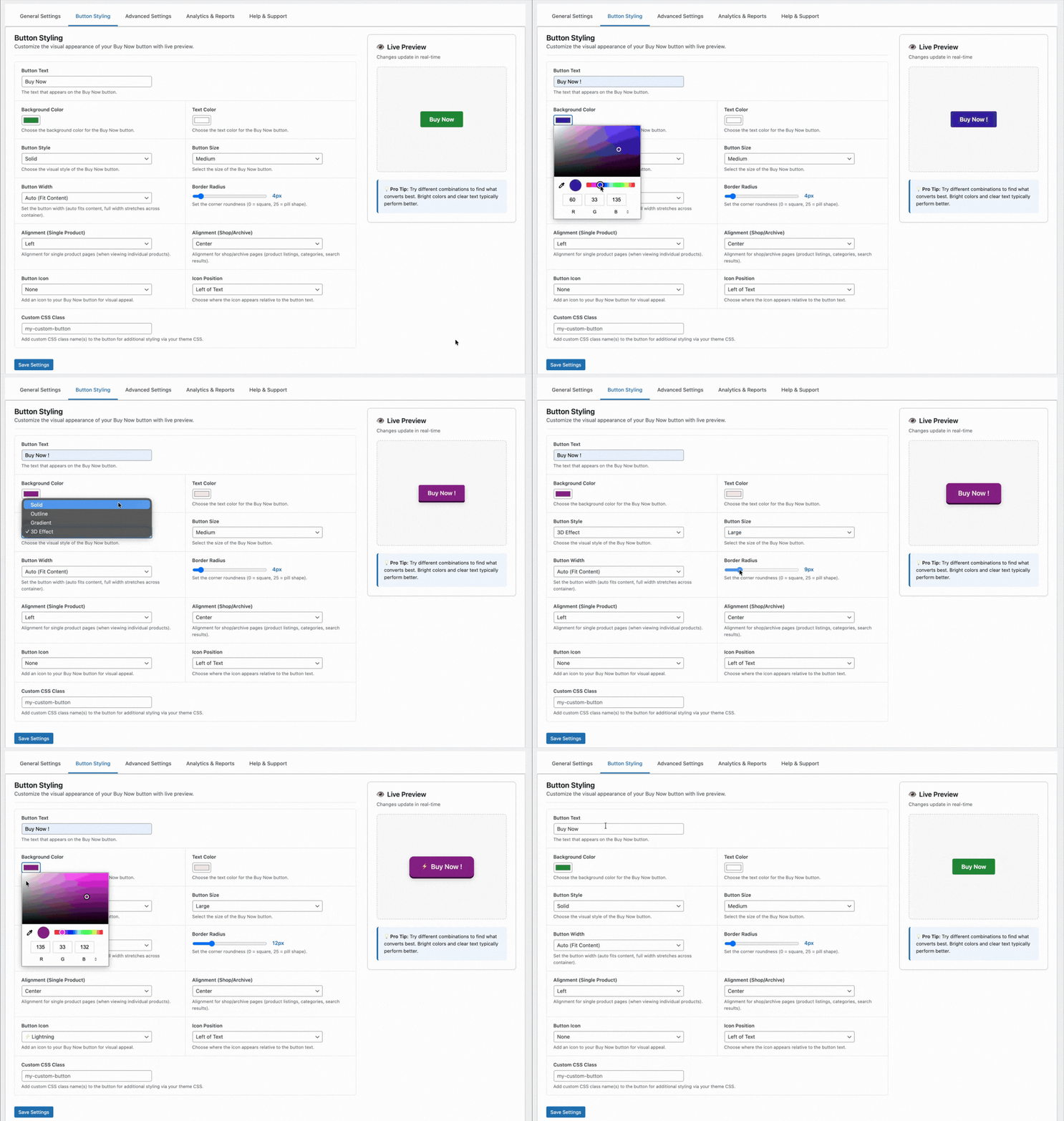
A Buy Now button that blends into your product page or looks out of place with your theme won’t convert. The TheForge Buy Now Button plugin gives you complete control over the button’s appearance and placement — without touching CSS or your theme’s code.
Button Text
The default text is “Buy Now” — but you can change it to anything. Popular alternatives:
- “Get It Now”
- “Order Now”
- “Buy Directly”
- “Skip the Cart”
- “Checkout Now”
You can also set different text for different product types or pages if needed.
Button Colour
Set the background colour, text colour, and hover state colour for the button. The plugin provides a colour picker in the settings panel — no need to enter hex codes manually. The border colour and border radius are also configurable.
For best results, use a colour that creates contrast with your Add to Cart button. If your Add to Cart is your theme’s primary colour, use a complementary accent colour for Buy Now so customers can clearly distinguish the two actions.
Button Size
Choose from preset sizes (small, medium, large) or enter a custom font size and padding. The button width defaults to match your Add to Cart button but can be set to full-width or a fixed pixel/percentage width.
Button Position
Configure where the Buy Now button appears relative to the Add to Cart button:
- Before Add to Cart — Buy Now is the first and most prominent action
- After Add to Cart — Add to Cart is primary, Buy Now is secondary
- Replace Add to Cart — only the Buy Now button is shown (recommended for landing pages and single-product stores)
You can set different positions for different product types or categories.
Icon Support
Add an icon before or after the button text. The plugin supports dashicons and common unicode characters — a shopping bag emoji, a lightning bolt, a right arrow — anything that reinforces the speed and directness of the action.
Responsive Behaviour
The button adapts to mobile automatically. On small screens where space is at a premium, you can set a different position or size specifically for mobile — for example, full-width on mobile and fixed-width on desktop.
Per-Product Overrides
Global settings apply to all products, but you can override any setting at the individual product level. The product edit screen has a Buy Now Button tab where you can customise text, colour, and position for that specific product.
Full styling documentation at the ThePluginForge support page.
Download Buy Now Button free →
Smart COD Control is a comprehensive toolkit for managing Cash on Delivery in WooCommerce. This guide walks you through every major setting from first install to a fully configured COD management system.
Installation
Install Smart COD Control from the WordPress plugin directory or upload the plugin ZIP. Activate it, then navigate to WooCommerce → Smart COD in your admin menu.
1. General Settings
The General tab controls the top-level COD behaviour:
- Enable/disable COD — master switch for all Smart COD Control rules
- COD label — what the payment method is called at checkout (“Cash on Delivery”, “Pay on Delivery”, etc.)
- COD description — supporting text shown at checkout
- Minimum order amount — COD not available below this value
- Maximum order amount — COD blocked above this value
2. OTP Verification
Configure SMS gateway, OTP length, expiry, resend limits, and the message template. Test with a real phone number before enabling.
3. Location Rules
Set country, state, and pincode allowlists or blocklists. Start permissive and tighten based on your RTO data.

4. Fee Settings
Set a fixed, percentage, or combined COD fee. Configure the label text and any exemption rules (by customer history, order value, or product category).
5. Trust Rules
Define what constitutes a “trusted” customer. Trusted customers can receive lighter restrictions — skipping OTP, lower fees, higher COD value caps.

6. Product and Category Rules
Block COD for specific products or entire categories. High-value electronics, fragile goods, custom/personalised items — configure which products can and can’t be purchased via COD.
7. Analytics and Reporting
The analytics tab shows your COD vs prepaid order split, blocked order counts, and RTO trends over time. Use this data to tune your rules.

Recommended Starting Configuration
If you’re not sure where to start:
- Enable OTP verification for all new customers
- Set a maximum COD order value of 2× your average order value
- Add a modest COD handling fee (₹25–₹50 or 2–3%)
- Review your RTO data after 30 days and add pincode blocks for problem areas
Full documentation and a setup walkthrough video are available at the ThePluginForge support page.
Download Smart COD Control free →
Every Cash on Delivery order carries a cost that prepaid orders don’t: the risk of a return shipment, the cost of the carrier’s COD collection fee (where applicable), and the operational overhead of handling a cash payment. A COD handling fee makes that cost visible to the customer — and nudges them toward prepaid alternatives.
The Psychology of COD Fees
When a customer sees “Cash on Delivery + ₹40 handling fee” next to “Pay Online — Free,” the comparison is clear. A small fee doesn’t need to cover your actual COD cost — it just needs to make the prepaid option look more attractive. Many stores report a 15–25% shift toward prepaid payment after adding a modest COD fee.
Setting Up the Fee in Smart COD Control
Go to WooCommerce → Smart COD → Fee Settings. You can configure the fee as:
- Fixed amount — e.g. ₹40 or $2.00 regardless of order value
- Percentage of order total — e.g. 2% of the cart value
- Combined — a fixed base plus a percentage component
The fee label shown to the customer is fully customisable. “COD Handling Fee”, “Cash Payment Surcharge”, or a more neutral “Service Fee” — whatever fits your store’s tone.
Fee Exemptions
Smart COD Control lets you configure fee exemptions. You might waive the COD fee for:
- Customers with a positive order history (rewarding loyalty)
- Orders above a certain value (high-value COD customers are often lower risk)
- Specific product categories (where COD is a strategic requirement)
- Specific geographic areas (where prepaid infrastructure is limited)
Minimum and Maximum Order Value for COD
Alongside the fee, you can set a minimum and maximum order value for COD eligibility. Small orders (under ₹500) might not warrant the overhead. Very large orders (over ₹10,000) carry enough RTO risk that you’d prefer to require prepayment or additional verification.
Tax Treatment of the Fee
The COD fee can be configured as taxable or tax-exempt. In most jurisdictions, a payment processing surcharge is not subject to GST/VAT — check your local tax rules and configure accordingly.
Testing the Fee
Before going live, place a test order using COD and verify the fee appears correctly on the order review, order confirmation email, and the WooCommerce order record.
Full setup documentation is available at the ThePluginForge support page.
Download Smart COD Control free →
OTP (One-Time Password) verification for Cash on Delivery is the most effective single technique for reducing fake WooCommerce orders. It adds five seconds of friction for legitimate customers and stops fraudulent orders cold. Here’s exactly how to set it up with Smart COD Control.
How OTP Verification Works
When a customer selects Cash on Delivery at checkout and clicks Place Order, Smart COD Control intercepts the order placement and sends a one-time password to the phone number the customer entered. The customer must enter the correct OTP on a verification screen before the order is confirmed. If the phone number is fake, no OTP arrives and the order never completes.
Step 1: Connect an SMS Gateway
Smart COD Control integrates with popular SMS gateways to deliver OTP messages. Supported gateways include Twilio, MSG91, Textlocal, and others. In the plugin settings (WooCommerce → Smart COD → OTP Settings), select your gateway and enter your API credentials.
If you’re not sure which gateway to use:
- Twilio — global coverage, easy setup, reliable
- MSG91 — popular for India and South Asia, competitive rates
- Textlocal — good UK coverage
Step 2: Configure OTP Settings
Once your gateway is connected, configure the OTP behaviour:
- OTP length — 4 or 6 digits (6 is more secure)
- OTP expiry — how long the OTP is valid (5–15 minutes is typical)
- Resend limit — how many times a customer can request a new OTP per session
- Resend cooldown — minimum time between resend requests (prevents OTP flooding)
- Max attempts — how many incorrect entries before the session is blocked
Step 3: Customise the OTP Message
The SMS message template is fully customisable. The default is something like: “Your ThePluginForge store verification code is {otp}. Valid for 10 minutes.” You can change this to match your store brand and include your store name.
Step 4: Test Before Going Live
Use a real phone number you own to test the full OTP flow before enabling it for customers. Place a test COD order, verify you receive the OTP, enter it correctly, and confirm the order completes. Also test the “wrong OTP” and “expired OTP” error states.
What Customers See
After clicking Place Order, the customer is shown a clean verification screen asking them to enter the OTP sent to their phone number. The screen displays the last few digits of the number for confirmation, a resend option (after the cooldown), and a countdown timer showing when the OTP expires.
Exempting Repeat Customers
You can configure Smart COD Control to skip OTP verification for customers with a positive order history — for example, customers who have previously placed and received at least one paid order. This reduces friction for loyal customers while maintaining protection for new and high-risk orders.
Full documentation and gateway setup guides are available at the ThePluginForge support page.