Displaying real-time shipping rates in WooCommerce is one of the single most effective ways to reduce cart abandonment and build customer trust. When shoppers see accurate, live carrier rates at checkout, they convert at higher rates — and you stop guessing what to charge. This guide walks you through everything you need to know to implement real-time shipping rates on your WordPress store.
Why Real-Time Shipping Rates Matter for WooCommerce Stores
Flat-rate shipping is simple to configure, but it comes with a hidden cost: you either overcharge customers (and lose sales) or undercharge (and eat the margin). Real-time rates solve this by pulling live pricing directly from carriers like UPS, USPS, FedEx, and DHL at the moment a customer checks out.
Studies consistently show that unexpected shipping costs are the #1 reason shoppers abandon carts. Showing accurate rates upfront removes that friction entirely.
What You Need Before Getting Started
- A WooCommerce store on WordPress
- Product weights and dimensions entered for each item
- A shipping origin address configured in WooCommerce settings
- A carrier API integration — which is exactly what EasyPost for WooCommerce by ThePluginForge provides
How EasyPost Powers Real-Time Shipping Rates in WooCommerce
EasyPost for WooCommerce is a WordPress-native plugin developed by ThePluginForge that connects your store to the EasyPost multi-carrier API. Instead of setting up individual carrier accounts and API keys for UPS, USPS, FedEx, and DHL separately, EasyPost acts as a single gateway to all of them.
Once installed, the plugin automatically queries each enabled carrier at checkout and returns live rates based on the customer’s address, cart weight, and package dimensions. No developer required.
Setting Up the Plugin Step by Step
- Install and activate EasyPost for WooCommerce from ThePluginForge
- Enter your EasyPost API key in the plugin settings
- Choose which carriers to display (UPS, USPS, FedEx, DHL, and more)
- Configure package presets or use per-product dimensions
- Enable the shipping method in WooCommerce → Settings → Shipping
- Test checkout with a sample address to confirm rates appear
The entire setup takes under 15 minutes for most stores. If you run into any configuration questions, ThePluginForge support team is available to help.
Optimizing Real-Time Rates for Conversion
Getting rates to show up is step one. Step two is making sure they convert. Here are proven tactics:
Display Multiple Carrier Options
Give customers choice. Showing three or four shipping options (economy, standard, express) lets price-sensitive shoppers pick what works for their budget while still offering speed for those who need it.
Use Friendly Service Names
Carrier service codes like “UPS_GROUND” or “FEDEX_HOME_DELIVERY” are confusing to customers. The EasyPost for WooCommerce plugin lets you rename services to plain language like “Standard Shipping (3–5 days)” so the checkout experience stays clean.
Add Estimated Delivery Dates
Customers want to know when their order arrives, not just what it costs. Displaying estimated delivery windows alongside rates is a proven conversion booster.
Common Real-Time Shipping Rate Problems (and How to Fix Them)
A few issues come up regularly when stores first enable real-time rates:
- Rates not showing: Usually caused by missing product weights or dimensions. Fill these in for every product in your catalog.
- Rates too high: Check your package presets — oversized box settings will inflate quotes. Use the smallest reasonable box size.
- Carrier not available: Some carriers restrict residential delivery or require minimum volumes. EasyPost’s dashboard shows which services are available for your account.
Real-Time Rates vs. Table Rate Shipping
Table rate shipping uses rules you define manually — for example, “orders over $50 ship for $5.99.” This works for simple stores but breaks down when you sell items of varying sizes and weights. Real-time rates scale automatically with every order, making them the better long-term solution for growing WooCommerce stores.
Conclusion
Adding real-time shipping rates to WooCommerce is one of the highest-ROI improvements you can make to your checkout flow. With the EasyPost for WooCommerce plugin from ThePluginForge, you get multi-carrier live rates without writing a single line of code. Set it up once and let accurate, dynamic pricing do the work of converting more shoppers into buyers.
Have questions about configuration? Visit ThePluginForge support for documentation and personalized help.
Frequently Asked Questions
Do I need individual carrier accounts to use real-time rates?
No. EasyPost acts as a single API gateway to multiple carriers, so you only need one EasyPost account to access UPS, USPS, FedEx, DHL, and more from your WooCommerce checkout.
Will real-time shipping rates slow down my checkout page?
EasyPost’s API is optimized for speed, and the EasyPost for WooCommerce plugin caches results intelligently. Most stores see rate results returned in under two seconds, which has no measurable impact on checkout conversion.
Can I show real-time rates and flat rates at the same time?
Yes. WooCommerce shipping zones support multiple methods simultaneously. You can offer a flat-rate option alongside live carrier rates and let the customer choose.
What happens if the EasyPost API is unavailable?
The plugin includes fallback configuration options. You can set a flat-rate fallback so checkout always works even if the carrier API is temporarily unreachable.
Choosing the right WordPress shipping plugin for WooCommerce can mean the difference between a checkout that converts and one that drives customers away. With dozens of options on the market in 2025, it is harder than ever to know which plugin actually delivers. This guide cuts through the noise and focuses on what matters: real-time rates, label printing, carrier coverage, and ease of use.
What to Look for in a WooCommerce Shipping Plugin
Before comparing individual plugins, it helps to know what the best ones have in common. Here is what separates great shipping plugins from mediocre ones:
- Multi-carrier support — USPS, UPS, FedEx, and DHL at minimum
- Real-time rate calculation — live carrier pricing at checkout, not static tables
- Label generation — buy and print labels without leaving WordPress
- Address validation — catch bad addresses before they become returned packages
- Tracking integration — automatic tracking number delivery to customers
- WordPress-native workflow — no external dashboards or switching tabs
EasyPost for WooCommerce by ThePluginForge
The standout choice in 2025 is EasyPost for WooCommerce, built by ThePluginForge. It checks every box on the list above and is purpose-built to feel like a native part of WooCommerce rather than an afterthought.
Key Features
- Real-time rates from 100+ carriers via the EasyPost API
- One-click label purchase and printing from the order screen
- Automatic tracking number injection and customer email notifications
- EasyPost address verification on every order
- Batch label processing for high-volume stores
- Commercial carrier discounts built in
ThePluginForge built this plugin with the philosophy that shipping should be invisible infrastructure — it should just work, quietly, without demanding your attention. The result is a plugin that handles complex shipping scenarios with minimal configuration.
Who It Is For
EasyPost for WooCommerce is ideal for stores shipping 10 to 10,000+ orders per month. It scales well because it sits on top of the EasyPost API, which was originally built for enterprise e-commerce and brought down-market to WordPress stores through ThePluginForge’s plugin.
How EasyPost Compares to Other WooCommerce Shipping Plugins
WooCommerce Shipping (Built-in)
WooCommerce’s built-in shipping supports USPS and DHL via official extensions, but each carrier requires a separate plugin purchase. There is no unified label printing workflow, and international carrier coverage is limited. It works for very simple stores but does not scale.
ShipStation
ShipStation is a powerful fulfillment platform, but it operates as a separate SaaS dashboard — you leave WordPress to fulfill orders. This breaks the workflow for teams that live in the WordPress admin. It also carries a recurring monthly subscription cost that increases with order volume, making it expensive for growing stores.
Table Rate Shipping Plugins
Table rate shipping plugins let you define custom shipping rules (weight-based, cart total-based, etc.) but require manual maintenance as carrier prices change. They are not connected to live carrier data, so rates drift out of alignment with actual costs over time.
Why EasyPost for WooCommerce Wins
The combination of multi-carrier real-time rates, native WordPress label printing, and automatic tracking — all in a single plugin — gives EasyPost for WooCommerce an edge that individual carrier plugins and external platforms cannot match. The workflow stays entirely inside WordPress, which means faster fulfillment and fewer context switches.
Specialized Plugins Worth Knowing
Local Pickup and Delivery Plugins
If you run a local business or restaurant, dedicated local delivery plugins add functionality that carrier-based plugins do not cover. For hybrid businesses (local plus shipping), these can run alongside EasyPost for WooCommerce without conflict.
Freight Shipping Plugins
Businesses shipping pallets or oversized items need LTL freight solutions. EasyPost supports some LTL carriers, so check with ThePluginForge support to confirm your specific freight needs before choosing a plugin.
Plugin Performance and Site Speed
Shipping plugins that make API calls at checkout must do so efficiently or they will slow down your checkout page. EasyPost for WooCommerce uses asynchronous requests and intelligent caching to ensure that rate lookups do not block page rendering. This is a technical detail that many cheaper plugins get wrong.
Conclusion
The best WordPress shipping plugin for WooCommerce in 2025 is the one that handles the most of your shipping workflow without requiring you to leave WordPress or hire a developer. EasyPost for WooCommerce by ThePluginForge delivers real-time multi-carrier rates, label printing, tracking, and address validation in one tightly integrated package that grows with your store.
Explore the plugin and get setup help at ThePluginForge support center.
Frequently Asked Questions
Is there a free WordPress shipping plugin for WooCommerce?
WooCommerce includes basic flat-rate and free shipping options out of the box. For real-time carrier rates and label printing, you need a plugin like EasyPost for WooCommerce, which connects to a paid carrier API — though EasyPost’s API pricing is pay-per-use with no monthly minimums.
Can I use multiple shipping plugins at the same time?
Sometimes, but it is not recommended. Conflicts between shipping plugins are a common source of checkout errors. A single comprehensive plugin like EasyPost for WooCommerce is almost always better than layering multiple plugins.
How often are shipping rates updated in the plugin?
Rates are pulled live from carriers at the time of checkout, so they always reflect current carrier pricing without any manual updates required on your end.
Does the plugin work with WooCommerce Subscriptions?
Yes. EasyPost for WooCommerce is compatible with WooCommerce Subscriptions for stores that ship physical subscription boxes or recurring product orders.
If you ship significant volume, dropping packages at the post office or a carrier drop-off point every day adds unnecessary time to your fulfilment workflow. Carrier pickup scheduling lets you book a collection at your address — the carrier comes to you.
The TheForge EasyPost Shipping plugin handles pickup scheduling directly from WordPress, without requiring you to log into the carrier’s website or make a phone call.
Which Carriers Support Pickup Scheduling?
Pickup scheduling is supported for major carriers via EasyPost:
- USPS — free package pickup at your address, scheduled up to 30 days in advance
- UPS — on-demand pickup or scheduled daily pickup (daily pickup has a weekly fee)
- FedEx — scheduled pickup at your address
- DHL — pickup scheduling via the EasyPost API
Scheduling a Pickup
From the EasyPost → Pickups panel in your WooCommerce dashboard, select the carrier, enter the pickup address (defaults to your store address), specify the earliest and latest window for the pickup, and choose the date. The plugin sends the request to EasyPost, which forwards it to the carrier’s pickup scheduling system.
You’ll receive a pickup confirmation number which the plugin stores against the pickup record. If you need to cancel, you can do so from the same panel — again, without leaving WordPress.

Pickup vs Drop-Off: Which Is Better?
For low-volume stores (under 10 packages per day), drop-off is usually fine. For higher volumes:
- USPS scheduled pickup is free and a no-brainer if you use USPS
- UPS daily pickup is cost-effective once you’re shipping consistently
- On-demand pickup is flexible for irregular shipping schedules
Combining Pickup with Bulk Labels
The workflow that saves the most time: generate all your labels in bulk at the same time each morning using the labels panel, then schedule a carrier pickup for later that day. Your packages are labelled, stacked, and ready — the carrier collects them without any further action from you.
For questions about pickup scheduling, visit the ThePluginForge support page.
Download TheForge EasyPost Shipping free →
A generous, easy returns policy is one of the most effective tools for building customer confidence — particularly for first-time buyers. Studies consistently show that customers are more likely to buy from stores where the returns process is clear and simple. Return labels are a key part of that equation.
The TheForge EasyPost Shipping plugin makes generating return labels as simple as generating outbound labels.
What Is a Return Label?
A return label is a pre-paid shipping label that the customer uses to send the product back to you. You absorb the shipping cost, but you gain significant advantages: controlled return flow, carrier account consolidation, and a professional customer experience.
Generating a Return Label
From any WooCommerce order screen where an outbound label exists, you’ll see a Generate Return Label button. Click it, select the carrier and service for the return (you might use a different service than the outbound — USPS First Class for lightweight returns, for example), and the plugin creates a pre-paid label addressed from the customer back to your store.

Sending the Return Label to the Customer
Once generated, you can:
- Email the label directly to the customer from the order screen
- Download the PDF and send it via your own email or helpdesk
- Include it in the original shipment — download and print alongside the outbound label
For high-value items or segments where return rates are low, including the return label in the box is a powerful trust signal even if most customers never use it.
Return Label Expiry
Return labels have an expiry date set by the carrier. Most are valid for 30–90 days. The plugin displays the expiry date on the order screen so you know when a label is no longer usable.
Cost Control
You see the cost of each return label before generating it — the same live rate you’d see for an outbound label. This lets you make informed decisions about when offering return labels makes financial sense (high-value orders, VIP customers) versus when you’d prefer to handle returns case-by-case.
Self-Service Returns (Coming Soon)
The roadmap for the EasyPost plugin includes a self-service return portal where customers can initiate a return from their My Account page without contacting support. Watch the plugin page for updates.
Questions about return label setup? Visit the ThePluginForge support page.
Download TheForge EasyPost Shipping free →
Carrier shipping rates are calculated based on the size and weight of the package you’re sending. If your WooCommerce store sends rate requests with inaccurate package dimensions, you’ll either overcharge customers (and lose sales) or undercharge (and eat the difference). The solution is accurate packing calculation — and that’s what 3D bin packing does.
What Is 3D Bin Packing?
3D bin packing is an algorithm that determines how a set of items can be arranged inside one or more boxes, given each item’s dimensions and each box’s dimensions. It considers not just whether items fit, but finds the smallest valid combination of boxes.
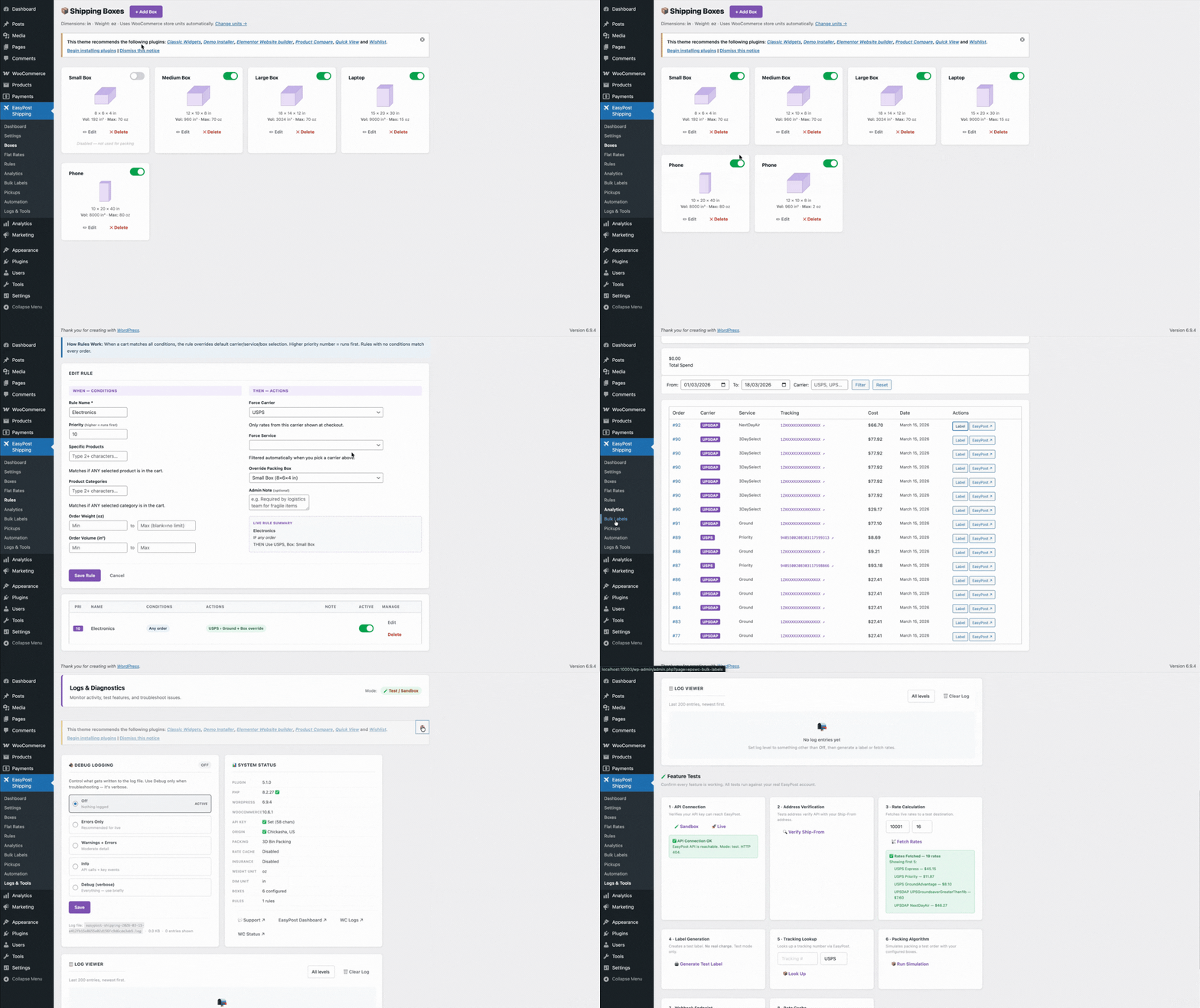
The TheForge EasyPost Shipping plugin runs this algorithm for every cart — testing every combination of item orientations (rotating items to try all six faces) and every combination of available boxes — to find the configuration that uses the smallest total box volume.
Why It Matters for Shipping Rates
Carriers charge based on whichever is greater: actual weight or dimensional weight. Dimensional weight is calculated as (length × width × height) / divisor. If you tell the carrier your box is 24″ × 24″ × 24″ when it’s actually 12″ × 12″ × 8″, you’ll be quoted a much higher rate.
Accurate packing calculation means:
- More accurate rate quotes at checkout
- No surprise carrier invoices for dimensional weight overages
- Fewer wasted boxes (smaller packaging = lower material costs)
- Potentially lower actual shipping costs from better box selection
Setting Up Your Box Sizes
Go to WooCommerce → Settings → Shipping → EasyPost → Packing and add the box sizes you actually use in your warehouse. For each box, enter:
- Box name (for your reference)
- Outer dimensions (length × width × height)
- Inner dimensions (what items can actually fit inside)
- Box weight (the weight of the empty box, added to the shipment weight)
- Max weight (how much the box can safely hold)
Add all the box sizes you use. The more accurately your box inventory is configured, the more accurate your rates will be.
Product Dimensions and Weight
For the packing algorithm to work, every product in your WooCommerce store needs weight and dimensions set. These are standard WooCommerce fields on the product → Shipping tab. If a product has no dimensions set, the plugin falls back to a configurable default — but it’s much better to set them correctly at the product level.
Multi-Box Shipments
When an order’s items don’t fit in a single box, the algorithm splits the shipment into multiple boxes and rates them as a multi-piece shipment. EasyPost handles multi-piece shipments natively, so the rate you get back is accurate for the actual number of boxes you’ll be shipping.
Overriding the Packing Algorithm
Some products should always ship in their own box — fragile items, products with awkward shapes, or anything that can’t be combined with other products for safety or quality reasons. You can mark individual products as “always ship in own box” and the packing engine will exclude them from combination packing.
Questions about packing configuration? The ThePluginForge support page has documentation and a help desk.
Get TheForge EasyPost Shipping free →
If you’re running a busy WooCommerce store, printing shipping labels one at a time is a genuine productivity killer. You open an order, generate the label, download it, print it — and repeat that 50 times a day. There’s a better way.
Bulk Label Printing with EasyPost
The TheForge EasyPost Shipping & Bulk Label Printing plugin connects your WooCommerce store directly to the EasyPost carrier network — and lets you generate and print labels for every open order at once.
Select your orders, hit Bulk Print, and every label lands in a single PDF ready for your printer. No switching tabs, no downloading individual files.
Live Rates from Every Major Carrier
Customers see real-time rates at checkout from USPS, UPS, FedEx, DHL and dozens more. The plugin fetches rates live from EasyPost so your customers always see accurate prices — no more overcharging or eating unexpected costs.
Smart 3D Bin Packing
The built-in packing engine tries all item rotations to work out the smallest box combination for every order. Fewer boxes means lower shipping costs and a smaller carbon footprint.
Address Validation at Checkout
Invalid addresses cause failed deliveries and wasted labels. The plugin validates every customer address in real time as they type, showing a green tick or a warning before they ever place the order.
Return Labels, Insurance & Carrier Pickup
Generate return labels for customers in one click. Add EasyPost shipment insurance to any order. Schedule carrier pickups without leaving your WooCommerce dashboard.
Get Started Free
The plugin is available free on WordPress.org. Download TheForge EasyPost Shipping →